
168 lines
10 KiB
Markdown
168 lines
10 KiB
Markdown
# @ant-design/pro-table
|
|
|
|
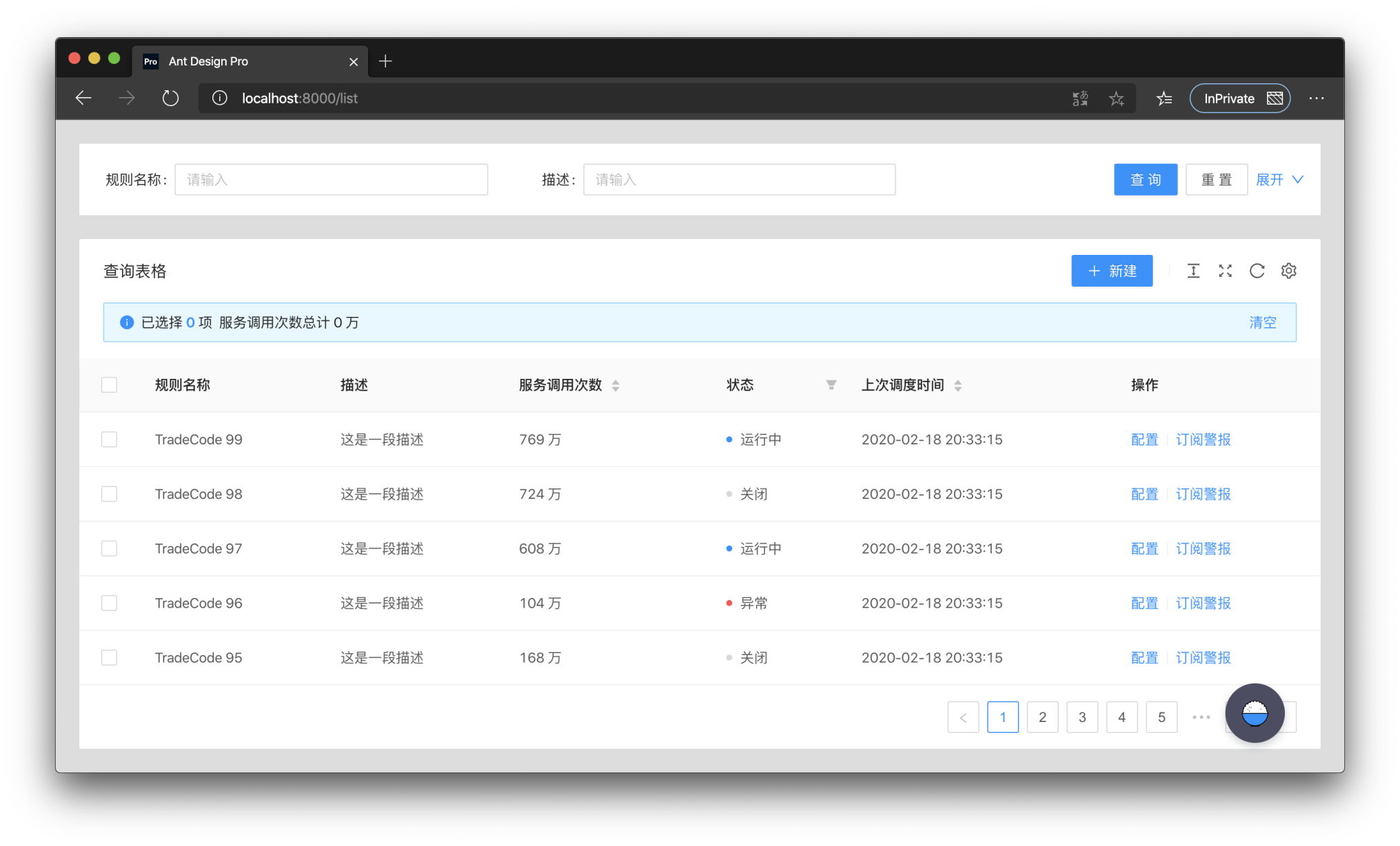
> ProTable was created to solve the problem of having to write a lot of sample code for tables in a project, so a lot of common logic was encapsulated in it. These wrappers can be simply categorized as pre-defined behaviors and pre-defined logic.
|
|
|
|
|
|
|
|
ProTable puts a layer of wrapping on top of antd's Table, supports some presets, and encapsulates some behaviors. Only api's that differ from antd Table are listed here.
|
|
|
|
### request
|
|
|
|
`request` is the most important API of ProTable, `request` takes an object. The object must have `data` and `success` in it, and `total` is also required if manual paging is needed. `request` takes over the `loading` settings and re-executes them when the query form is queried and the `params` parameters are modified. Also the query form values and `params` parameters are brought in. The following is an example.
|
|
|
|
```tsx | pure
|
|
<ProTable<DataType, Params>
|
|
// params is a parameter that needs to be self-contained
|
|
// This parameter has higher priority and will override the parameters of the query form
|
|
params={params}
|
|
request={async (
|
|
// The first parameter params is the combination of the query form and params parameters
|
|
// The first parameter will always have pageSize and current, which are antd specifications
|
|
params: T & {
|
|
pageSize: number;
|
|
current: number;
|
|
},
|
|
sort,
|
|
filter,
|
|
) => {
|
|
// Here you need to return a Promise, and you can transform the data before returning it
|
|
// If you need to transform the parameters you can change them here
|
|
const msg = await myQuery({
|
|
page: params.current,
|
|
pageSize: params.pageSize,
|
|
});
|
|
return {
|
|
data: msg.result,
|
|
// Please return true for success.
|
|
// otherwise the table will stop parsing the data, even if there is data
|
|
success: boolean,
|
|
// not passed will use the length of the data, if it is paged you must pass
|
|
total: number,
|
|
};
|
|
}}
|
|
/>
|
|
```
|
|
|
|
### ProTable
|
|
|
|
| Property | Description | Type | Default Value |
|
|
| --- | --- | --- | --- |
|
|
| request | How to get `dataSource` | `(params?: {pageSize,current},sort,filter) => {data,success,total}` | - |
|
|
| params | Additional parameters used for `request` query, once changed will trigger reloading | `object` | - |
|
|
| postData | Process the data obtained through `request` | `(data: T[]) => T[]` | - |
|
|
| defaultData | Default data | `T[]` | - |
|
|
| dataSource | Table data, protable recommends using request to load | `T[]` | - |
|
|
| onDataSourceChange | Triggered when Table data changes | `(dataSource: T[]) => void` | - |
|
|
| actionRef | Reference to Table action for custom triggering | `MutableRefObject<ActionType>` | - |
|
|
| formRef | The form instance of the query form can be obtained for some flexible configuration | `MutableRefObject<FormInstance>` | - |
|
|
| toolBarRender | Render toolbar, support returning a dom array, will automatically increase margin-right | `(action) => ReactNode[]` | - |
|
|
| onLoad | Triggered after the data is loaded, it will be triggered multiple times | `(dataSource: T[]) => void` | - |
|
|
| onLoadingChange | Triggered when loading is modified, usually caused by network requests | `(loading:boolean)=>void` | - |
|
|
| onRequestError | Triggered when data loading fails | `(error) => void` | - |
|
|
| tableClassName | className of the encapsulated table | `string` | - |
|
|
| tableStyle | style of the encapsulated table | [CSSProperties](https://www.htmlhelp.com/reference/css/properties.html) | - |
|
|
| options | table toolbar, not displayed when set to false | `{{ density?: boolean, fullScreen?: boolean \| function, reload?: boolean \| function, reloadIcon?: React.ReactNode, densityIcon?: React.ReactNode, setting?: boolean \|` [SettingOptionType](#menu-bar-options-configuration) `}}` | `{ fullScreen: false, reload :true, density: true, setting: true}` |
|
|
| search | Whether to display the search form, when the object is passed in, it is the configuration of the search form | `false` \| [SearchConfig](#search-search-form) | - |
|
|
| dateFormatter | Convert moment format data to a specific type, false will not be converted | `"string"` \| `"number"` \| ((value: Moment, valueType: string) => string \| number) \|`false` | `"string"` |
|
|
| defaultSize | Default size | SizeType | - |
|
|
| beforeSearchSubmit | Make some changes before searching | `(params:T)=>T` | - |
|
|
| onSizeChange | The table size has changed | `(size:'default' \|'middle' \|'small') => void` | - |
|
|
| type | pro-table type | `"form"` | - |
|
|
| form | antd form configuration | [FormProps](https://ant.design/components/form-cn/#API) | - |
|
|
| onSubmit | Triggered when the form is submitted | `(params: U) => void` | - |
|
|
| onReset | Triggered when the form is reset | `() => void` | - |
|
|
| columnEmptyText | Display when it is empty, display `-` when it is not set, false can turn off this function | `string` \| `false` | false |
|
|
| tableRender | Custom rendering table function | `(props,dom,domList:{ toolbar,alert,table}) => ReactNode` | - |
|
|
| toolbar | Transparent transmission of `ListToolBar` configuration items | [ListToolBarProps](#listtoolbarprops) | - |
|
|
| tableExtraRender | The main function of the custom table | `(props: ProTableProps<T, U>, dataSource: T[]) => ReactNode;` | - |
|
|
| manualRequest | Do you need to manually trigger the first request? When configured as `true`, the search form cannot be hidden | `boolean` | false |
|
|
| editable | Related configuration of editable table | [TableRowEditable](/en-US/components/editable-table#editable-edit-line-configuration) | - |
|
|
| cardBordered | Border of Card components around Table and Search | `boolean \| {search?: boolean, table?: boolean}` | false |
|
|
| ghost | Ghost mode, that is, whether to cancel the padding of the table content area. | `boolean` | false |
|
|
| debounceTime | Debounce time | `number` | 10 |
|
|
| revalidateOnFocus | Automatically re-request when the window is focused | `boolean` | `false` |
|
|
| columnsState | Column Status Control, you can operate the display hide | `ColumnStateType` | - |
|
|
|
|
#### RecordCreator
|
|
|
|
| Property | Description | Type | Default Value |
|
|
| --- | --- | --- | --- |
|
|
| record | The row data to be added, generally contains a unique key | `T` | `{}` |
|
|
| position | Where does the line increase, start or end | `top` \| `bottom` | `bottom` |
|
|
| (...buttonProps) | [ButtonProps](https://ant.design/components/button-cn/#API) of antd | ButtonProps | — |
|
|
|
|
#### ColumnStateType
|
|
|
|
| Property | Description | Type | Default |
|
|
| --- | --- | --- | --- |
|
|
| defaultValue | The default value of the column status, only for the first time. Used for resetting value | `Record <string, ColumnsState>;` | |
|
|
| value | Column status, support controlled mode | `Record <string, ColumnsState>;` | |
|
|
| onChange | Column status After changing | `(value: Record <string, ColumnsState>) => void` | |
|
|
| PersistenceKey | The key of the persistence column is used to determine if it is the same table | `string \| Number` | |
|
|
| PersistenceType | The type of persistence column, localStorage is also existing after closing the browser, sessionStorage closes the browser will be lost | `localStorage \| sessionStorage` | |
|
|
|
|
#### Search Search form
|
|
|
|
| Property | Description | Type | Default Value |
|
|
| --- | --- | --- | --- |
|
|
| filterType | Filter form type | `'query'` \| `'light'` | `'query'` |
|
|
| searchText | Search button text | `string` | Search |
|
|
| resetText | reset button text | `string` | reset |
|
|
| submitText | The text of the submit button | `string` | Submit |
|
|
| labelWidth | Label width | `'number'` \| `'auto'` | 80 |
|
|
| span | Configure the number of columns in the query form | `'number'` \| [`'ColConfig'`](#ColConfig) | defaultColConfig |
|
|
| className | Encapsulated search Form className | `string` | - |
|
|
| collapseRender | Collapse button render | `((collapsed: boolean,showCollapseButton?: boolean) => ReactNode)`\|`false` | - |
|
|
| defaultCollapsed | Whether to collapse by default | `boolean` | true |
|
|
| collapsed | collapsed | `boolean` | - |
|
|
| onCollapse | Collapse button event | `(collapsed: boolean) => void;` | - |
|
|
| optionRender | Custom action bar | `((searchConfig,formProps,dom) => ReactNode[])`\|`false` | - |
|
|
| showHiddenNum | Whether to show the number of hidden items after storing | `boolean` | `false` |
|
|
|
|
### editable edit line configuration
|
|
|
|
| Property | Description | Type | Default Value |
|
|
| --- | --- | --- | --- |
|
|
| type | Type of editable table, single or multiple | `single` \| `multiple` | - |
|
|
| form | Form instance of editable form, use `Form.useForm` to generate and use | `FormInstance` | - |
|
|
| formProps | form properties can be configured, but onFinish is not supported | [\`FormProps'](https://procomponents.ant.design/components/form#proform) | - |
|
|
| editableKeys | Row being edited, controlled attributes. The default`key` will use the configuration of `rowKey`,if there is no configuration, it will use the`index`, it is recommended to use rowKey | `Key[]` | - |
|
|
| onChange | Triggered when row data is modified | `(editableKeys: Key[], editableRows: T[]) => void` | - |
|
|
| onSave | Triggered when a row is saved | `(key: Key, row: T,originRow:T,newLine?:newLineConfig) => Promise<any>` | - |
|
|
| saveText | Text for saving a row | `React.ReactNode` | `Save` |
|
|
| onDelete | Triggered when a row is deleted | `(key: Key, row: T) => Promise<any>` | - |
|
|
| deleteText | Text for deleting a row | `React.ReactNode` | `Delete` |
|
|
| onCancel | Triggered when cancel editing a line | `(key: Key, row: T,originRow:T,newLine?:newLineConfig) => Promise<any>` | - |
|
|
| cancelText | Text for canceling the editing of a row | `React.ReactNode` | `Cancel` |
|
|
| actionRender | Custom edit mode action bar | `(row: T, config: ActionRenderConfig<T>) => ReactNode[]` | - |
|
|
| deletePopconfirmMessage | The pop-up confirmation box prompt message when deleting | `ReactNode` | `Delete this line?` |
|
|
| onlyOneLineEditorAlertMessage | Only one line can be edited | `ReactNode` | `Only one line can be edited at the same time` |
|
|
| onlyAddOneLineAlertMessage | Only one line can be added at the same time | `ReactNode` | `Only add one line` |
|
|
|
|
#### ColConfig
|
|
|
|
```tsx | pure
|
|
const defaultColConfig = {
|
|
xs: 24,
|
|
sm: 24,
|
|
md: 12,
|
|
lg: 12,
|
|
xl: 8,
|
|
xxl: 6,
|
|
};
|
|
```
|
|
|
|
## Install
|
|
|
|
Using npm:
|
|
|
|
```bash
|
|
$ npm install --save @ant-design/pro-table
|
|
```
|
|
|
|
or using yarn:
|
|
|
|
```bash
|
|
$ yarn add @ant-design/pro-table
|
|
```
|